> debug marketing #2
V2 in one week
The Visual Generator got a complete V2 upgrade, the strategy shifted audience-first, and an AI personal assistant now coordinates all my projects. Another 20-hour weekend.
> unlock
Read the full edition
Enter your email to unlock this article and get future editions delivered to your inbox.
Hi team,
You know that feeling when you look at something you made a week ago and physically cringe? That was me on Monday morning looking at my week 1 visuals. Like discovering your old Facebook posts from 2014 but worse, because I actually published these on purpose.
Good news: I fixed it. In one weekend. And then built two other things I didn’t plan to build. (The usual.)
Three things happened this week: the Visual Generator got a complete V2 upgrade, the strategy shifted from “too technical” to “actually useful for real people,” and I put an AI personal assistant above all my projects. That last one might be the craziest thing I’ve built so far.
Another 20-hour weekend. Let me break it down.
The Visual Generator Got a Glow-Up
Background
The V1 visuals technically worked. Right colors, right fonts, right layout. But nobody was going to stop scrolling for them. They looked like exactly what they were: a first attempt by someone who isn’t a designer. (Spoiler: I’m still not a designer. The system just got better at hiding that.)
Under the Hood
Instead of guessing what “good” looks like, I went looking for examples. Found a creator whose visuals consistently stood out on LinkedIn. Used a scraping tool to collect his posts and save the visual style as reference material. Then I fed those references into my system and started steering: more depth, better spacing, lighter accents, gradient backgrounds, a light and dark version for each template.
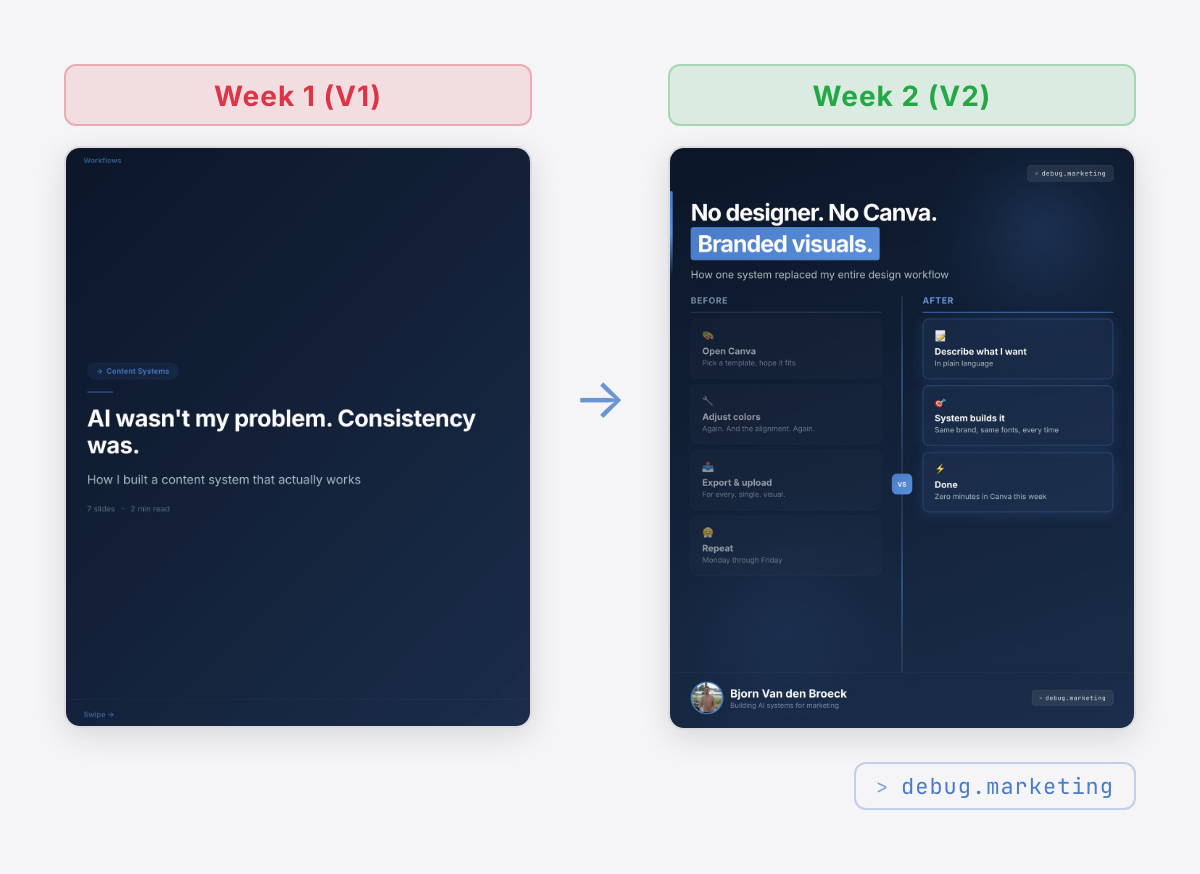
The system now has two visual modes. Light theme for posts that need to feel clean and approachable. Dark theme for the dramatic, techy vibes. Both with proper brand consistency. Same fonts, same colors, same badge, different mood.
I also added a critique loop. After generating a visual, the AI reviews it against the reference examples and suggests improvements before I even see it. It’s like having a designer who checks their own work before the meeting. Which is nice, because I genuinely cannot tell the difference between good and slightly-better spacing. (Before you ask: yes, it matters.)
The best part? I just describe what I want in plain language, and the system builds it. If it’s not right, I tell it what to change. No design tools. No dragging boxes around wondering why things won’t align. I just talk to it.
Strategy Shift: Writing for Actual Humans
This one took more thinking than building. My original content was way too technical. I was writing about the internals of the system instead of what it actually does. Nobody outside of developers cares about the plumbing. And I’m definitely not writing for developers.
So I went through everything. The positioning. The voice profile. The audience docs. Every piece of content now gets a simple test: would someone who runs marketing but has never touched AI understand this without Googling anything? If the answer is no, rewrite it.
Sounds simple. It wasn’t. It meant opening every file and asking: “Is this written for me, or for the people reading it?” Turns out, most of it was written for me. Oops.
The result: the posts you see this week read completely differently from last week. Less “look what I built,” more “here’s what this actually means for your work.”
Barri: My AI That Manages My Other AIs
This is the one that sounds ridiculous when I explain it, but bear with me.
I have multiple projects: Content Engine (this newsletter and everything around it), a Business Hub (email, CRM, consulting), and my work projects at ElmosGroup. Each lives in its own project with its own AI setup.
Before this week, I was the only one who knew what was happening across all of them. I’d open one project, work for an hour, switch to another, lose context, switch back.
Barri (running on a platform called OpenClaw) now sits above all of them. Each project has its own orchestrator (think: a project manager AI), and Barri manages the orchestrators. So instead of me being the central nervous system, Barri is.
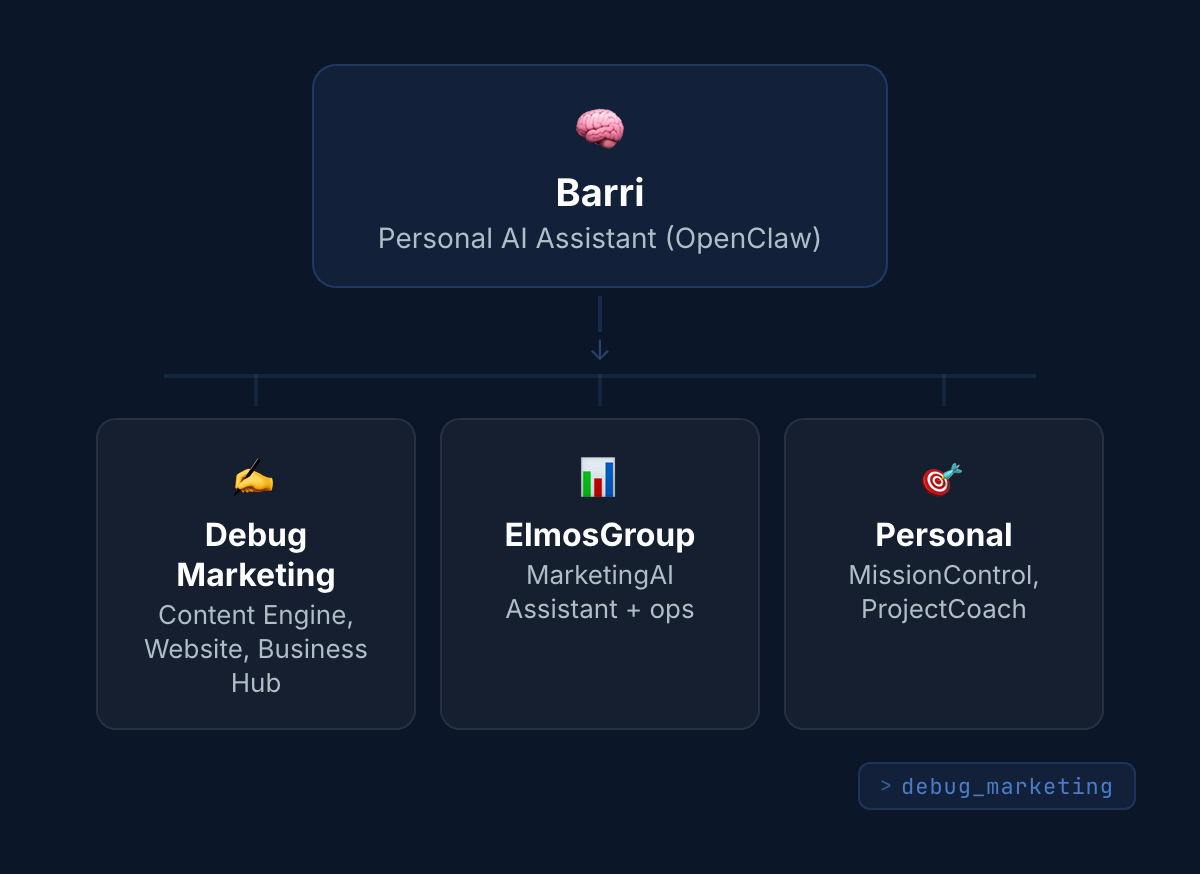
In practice: I work on content, and at the end of the day there’s a status update waiting from other projects. The first parallel work sessions already happened this week. It’s early. But the foundation is there, and honestly, it already feels like having a very quiet, very organized colleague.
And here’s where it gets interesting. I’m already thinking about the next step: giving Barri a proper company structure. Me as CEO setting direction, Barri as COO coordinating everything, and under that a CTO (for developer and security tasks), CMO (content and visuals), CRO (data analysis), a personal assistant called Kai, and a dedicated researcher. Basically building an AI company around myself.
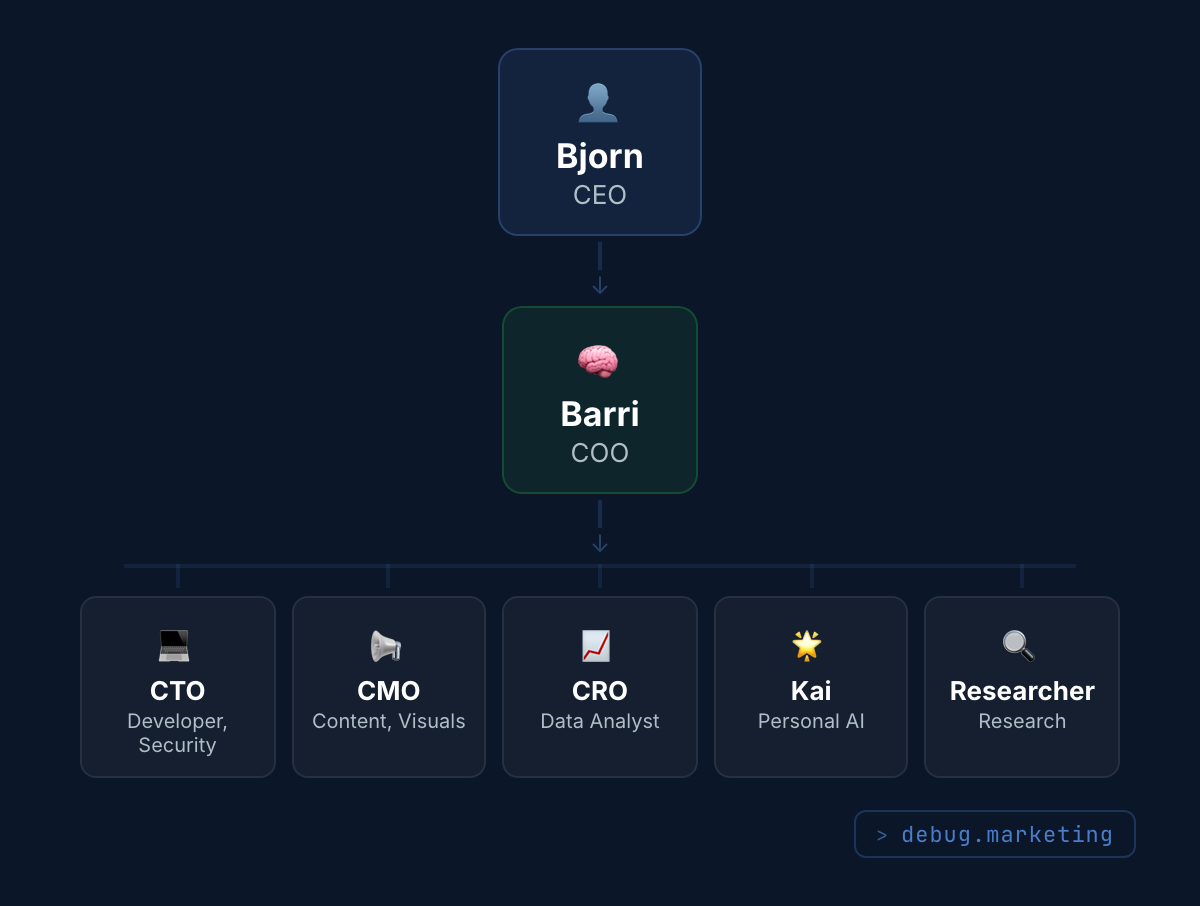
Sounds crazy? Probably. But think about it: every role you’d hire for has specific tasks, specific context, and specific goals. AI can handle all of that if you structure it right. The question isn’t “can AI do this” anymore. It’s “how do I organize it so it actually works together.”
What Broke (and the Fix)
The visual generator went through multiple rounds. First attempt after adding the references was better but still not right. Too much gradient. Spacing was off on mobile. The critique loop helped here because instead of me eyeballing every slide, the system flagged issues before I saw them.
The strategy rewrite was messier. First pass went too far in the other direction: too simple, lost all substance. Finding the balance between “accessible” and “still saying something useful” took a few rounds. The readability test helps as a filter, but applying it consistently across 20+ files takes patience. First I was writing for myself. Then I was writing for a five-year-old. Finding the middle ground took three rewrites.
Barri’s setup was surprisingly smooth. The hardest part was deciding the hierarchy: which projects get their own orchestrator, which ones Barri handles directly. Once that was clear, the rest was just structuring plan files so Barri could read them. The “AI company” structure is still just an idea on paper, but laying it out helped me think about what each role would actually do.
What I Learned
Research before building. The biggest thing I’d do differently from the start: spend more time collecting examples of what you like before you build anything. Visual styles, writing styles, formatting. Save them, organize them, feed them to your AI. The system is only as good as the references you give it. I spent hours building V1 when 30 minutes of research would’ve made V1 look like V2.
Your AI needs a boss too. Multiple AI-powered projects without coordination is just a more sophisticated version of having 15 Chrome tabs open. One layer above everything that knows what’s happening everywhere. That’s the difference.
Write for your reader, not for yourself. Easy to say “think about who’s reading this.” Much harder to go through every file in your system and rewrite it from their perspective. But once you do, the output quality jumps immediately. If someone without a technical background can’t understand it, it’s not done.
Dashboard
- Tools used: Claude Code (Opus 4.6), VS Code, Apify (scraping), OpenClaw/Barri
- Time invested: ~20 hours (weekend)
- Cost: $200/month Claude Max + Apify credits
- What shipped: Visual Generator V2, strategy overhaul (positioning + voice + ICP), Barri orchestrator foundation
- Status: Shipped, iterating
- Next week: Website rebrand (debug.marketing), publish week 8 posts, first parallel work with Barri
What’s the one thing in your workflow you keep doing manually that you know could be better?
Hit reply and tell me. I read every response.